Free fleet templates
Maintenance Work Order Template
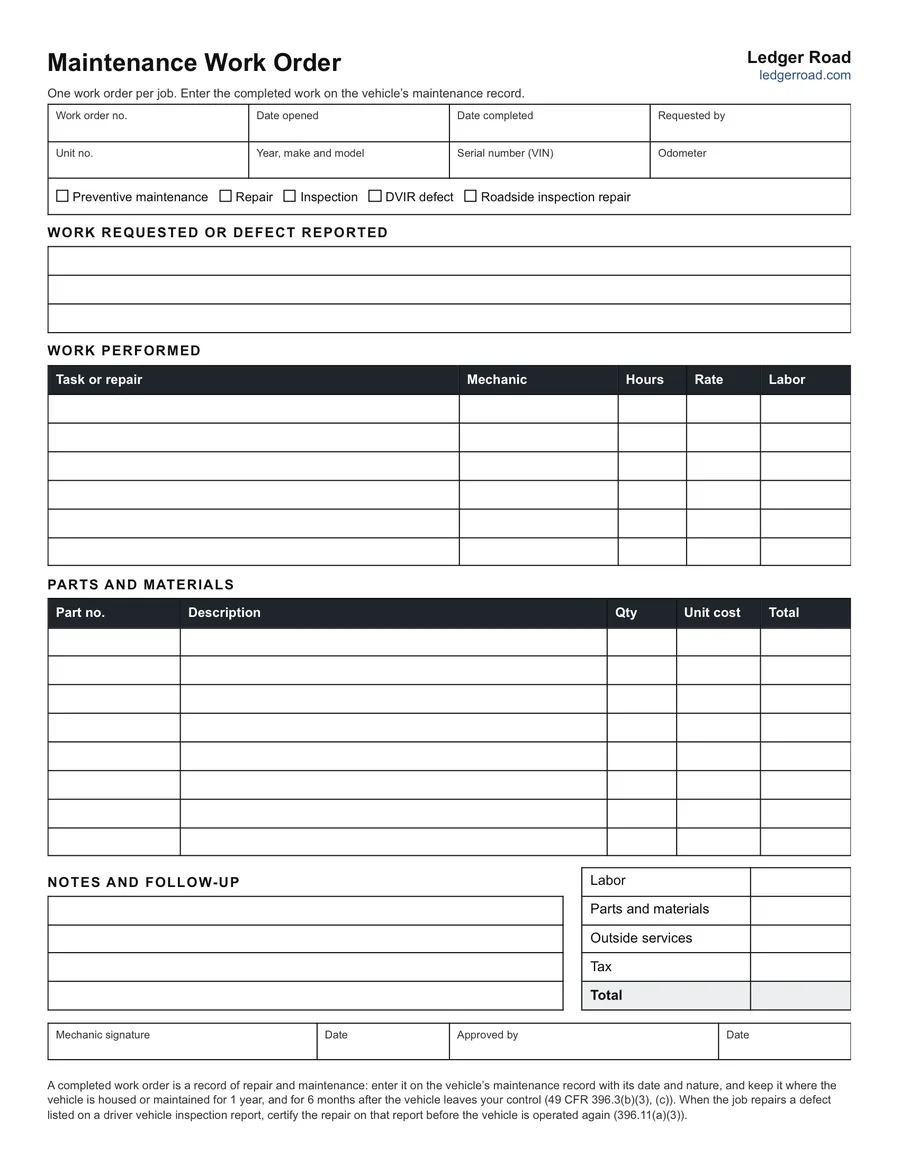
A one-page work order form for a vehicle repair or service job: what was asked for, the work performed, parts and labor, the total and sign-off. It comes as a printable PDF, a Word document you can edit, and an Excel work order that does the arithmetic.
No signup needed. All three files are free to use and change.
What's on the work order
- The job: work order number, date opened, date completed and who asked for it.
- The vehicle: unit number, year, make and model, serial number and odometer.
- The type of work: preventive maintenance, repair, inspection, a defect from a driver's inspection report, or a repair after a roadside inspection.
- Work requested or defect reported: three lines for what the driver or dispatcher said.
- Work performed: six lines for each task, the mechanic, hours, rate and labor.
- Parts and materials: eight lines for part number, description, quantity, unit cost and total.
- Totals: labor, parts, outside services, tax and the total.
- Notes, follow-up and sign-off: the mechanic's signature and an approval line.
The Word version
The Word document is the same one-page form as the PDF, on US Letter paper. Open it in Word to put your company name at the top, rename a line or add rows for longer jobs, then print it or save it as your own work order template. It has no formulas, so labor, parts and the total are written in by hand. The Excel workbook works them out.
What the Excel workbook adds
The Work order sheet is the same form with the sums done for you: labor per line, parts per line and the total. It prints on one page. A second sheet, the Work order log, lists every work order with its dates, unit, cost and whether it is open or closed, and counts the days each one has been open. Each sheet has an example in yellow to type over.
Work order and maintenance log: which is which
The work order is the full record of one job. The maintenance log is the vehicle's running history, one line per job, and its "Invoice or work order" column holds the work order number. Fill in the work order as the job is done, then enter a line in the truck maintenance log and file the two together.
Where a work order starts
- A scheduled service. The maintenance schedule says a service is due; the work order lists what was done.
- A driver's report. A defect on a driver vehicle inspection report becomes a work order. When the repair is finished, the repair is also certified on that report before the vehicle goes out again (§396.11(a)(3)).
- A roadside inspection. Violations noted on an inspection report have to be corrected, and the work order shows the correction.
An example job
Work order WO-1042 is opened on September 11 for unit T-101 at 412,380 miles: a preventive maintenance service. The mechanic changes the oil and filter, greases the chassis and measures brake stroke, 2.5 hours at $95, which is $237.50 in labor. Oil, filter and grease come to $248.70. The total is $486.20. The note records that the left steer tire is wearing on its outer edge and the alignment should be checked. The job is closed on September 12, and one line goes in the maintenance log with WO-1042 as its reference.
Work orders that hold up later
- Number every one. A unique number is what ties the work order to the log entry and the parts invoice.
- Write the work in words a stranger can follow. "Replaced left front brake chamber" says more than "brakes".
- Record the odometer. It dates the job against the vehicle's service intervals.
- Close it. A completion date and a signature show the work was finished and the vehicle went back into service.
Questions
Does the Excel work order add up the totals?
Yes. Each labor line is hours times rate, each parts line is quantity times unit cost, and the sheet totals labor, parts, outside services and tax. Open it in Excel or upload it to Google Sheets.
Can I edit the work order in Word?
Yes. The Word document is the same one-page form as the PDF. Add your company name, rename a line or add rows, then print it or keep it as your own template.
Is it only for trucks?
No. It works for any vehicle or piece of equipment with a unit number: trucks, trailers, vans, buses or yard equipment. The rule notes at the foot apply to commercial motor vehicles.
Can a repair shop use it for customers?
It is laid out for a fleet's own shop, so it has no customer, authorization or payment section. A shop billing customers would add those.
How long do we keep work orders?
A completed work order is a record of repair and maintenance. Keep it where the vehicle is housed or maintained for one year, and for six months after the vehicle leaves your control (49 CFR 396.3(c)).