Free fleet templates
Driver Qualification File Checklist
A DQ file checklist as a one-page PDF or Word file for the front of each driver's file, and an Excel tracker that covers every driver and works out when the next driving record, review and medical renewal are due.
No signup needed. All three files are free to use and change.
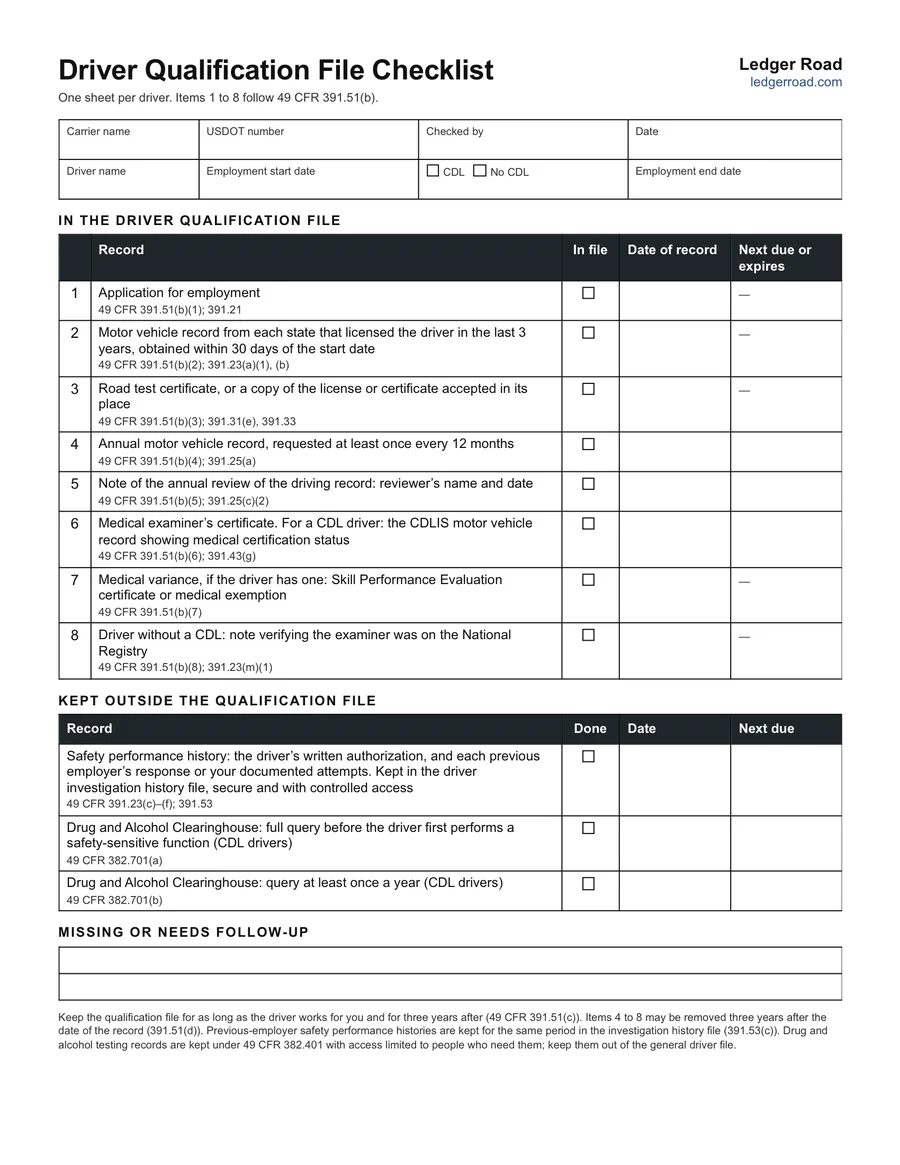
What's on the checklist
Eight records, in the order 49 CFR 391.51(b) lists them, each with an In file box, the date of the record and when it is next due:
- The application for employment (§391.21).
- The motor vehicle record from each state that licensed the driver in the last three years, obtained within 30 days of the start date (§391.23).
- The road test certificate, or a copy of the license or certificate accepted in its place (§391.31, §391.33).
- The annual motor vehicle record, requested at least once every 12 months (§391.25).
- The note of the annual review of that record, with the reviewer's name and the date.
- The medical examiner's certificate or, for a CDL driver, the CDLIS motor vehicle record showing medical certification status.
- Any medical variance: a Skill Performance Evaluation certificate or a medical exemption.
- For a driver without a CDL, the note verifying the examiner was on the National Registry.
A second table covers what is checked at hire and kept outside the qualification file: the safety performance history from previous employers (§391.23, §391.53) and the two Drug and Alcohol Clearinghouse queries for CDL drivers (§382.701).
What the Excel tracker adds
The tracker has one row per driver and a column for the date on each record. From those dates it works out the next annual driving record and review, whether the medical certificate has expired or will within 60 days, the next Clearinghouse query and, once a driver has left, the date the file can go. Overdue dates turn red. A second sheet repeats the one-page checklist for printing.
CDL and non-CDL drivers
The medical record differs. For a CDL driver, the file holds the CDLIS motor vehicle record from the licensing state, which shows the medical certification status; enter the date you pulled it and the expiry it shows. For a driver without a CDL, file the medical examiner's certificate itself and a note that the examiner was listed on the National Registry.
How to use it
Open each document before ticking In file, and write the date printed on the record, which is the date the retention period runs from. Where something is missing, use the follow-up lines to say what and who is chasing it. Keep the checklist at the front of the file and update it when a new driving record or medical record arrives.
How long to keep the file
Keep a driver's file for as long as they work for you and for three years after they leave (§391.51(c)). Some records can come out sooner: annual driving records and review notes, medical certificates, medical variances and National Registry notes may be removed three years after the date they were made (§391.51(d)).
Keeping it current through the year
- Medical certificates: note each expiration and schedule the renewal ahead of it.
- Annual driving records: the request and the review are two lines for a reason; both need doing each year.
- New hires: start their row before the first trip so missing hiring records show up early.
- Departures: enter the leaving date so you know when the three years run out.
Questions
Does the checklist work for drivers without a CDL?
Yes. Item 6 covers the medical examiner's certificate for any driver, and item 8 is the note that the examiner was on the National Registry, which applies to drivers who are not required to hold a CDL.
Where do drug and alcohol test records go?
Outside the qualification file. They are kept under 49 CFR 382.401 with access limited to the people who need them. The checklist and the tracker record only the dates of the Clearinghouse queries.
Does the Excel tracker open in Google Sheets?
Yes. Upload the .xlsx file to Google Drive and open it with Sheets, or open it in Excel. The due-date columns work in both.
How many drivers does the tracker hold?
One hundred rows are formatted with the due-date columns. Two example drivers are filled in to type over.
Related
Read the driver qualification file guide →